Node.js
What is Node.js ?
Node.js is a JavaScript runtime environment built on the V8 JavaScript engine, the core of Google Chrome, which allows developers to run JavaScript on server side across platforms.
Motivation
Before Node.js, traditional web servers such as Apache used one thread per connection (improved by introducing Apache MPM Worker). Under massive concurrency scenarios, however, such model takes up memories compared to a single-threaded model and has overhead during context-switching.
So for use cases such as server that executes large concurrent and non-blocking tasks (e.g massive concurrent file I/O or database queries), single-thread approach might be a better model.
To take advantage of single-thread model, event loop model that utilizes callbacks for each task is adopted. Such model allows users to write more intuitive non-blocking codes as shown below.
readFile('/file.md', () => {
  console.log(data) // Logs after finish reading without blocking following works
});

moreWork() // This can get executed before file content is completely read and printed out (non-blocking)
There were frameworks such as Twisted (Python) and EventMachine (Ruby) that leveraged the event loop model, but such frameworks were somewhat confusion to combine and work with other libraries. Luckily, JavaScript is built in a way that works perfectly with the model: it's single-thread, callbacks get executed when user input event occurs, and has features such as anonymous functions and closures, etc.
So Node.js was proposed to provide a purely evented, non-blocking infrastructure to script hightly concurrent programs.
The design goals are (excerpted from Ryan Dahl's, creator of Nodejs, presentation):
- No function should direct perform I/O. There must be a callback.
- Low-level.
- Stream everything: never force the buffering of data
- Do not remove functionality present at the POSIX layer. For example, support half-closed TCP connections.
- Have built-in support for the most important protocols: TCP, DNS, HTTP, etc.
- Support HTTP features: cunked request/response, keep-alive, etc.
- API should be familiar to client-side js
- Platform independent
A presentation delivered by Ryan Dahl, creator of Nodejs, presented Node.js back in 2009 which gave a brief introduction into the design background and philosophy of Node.js.
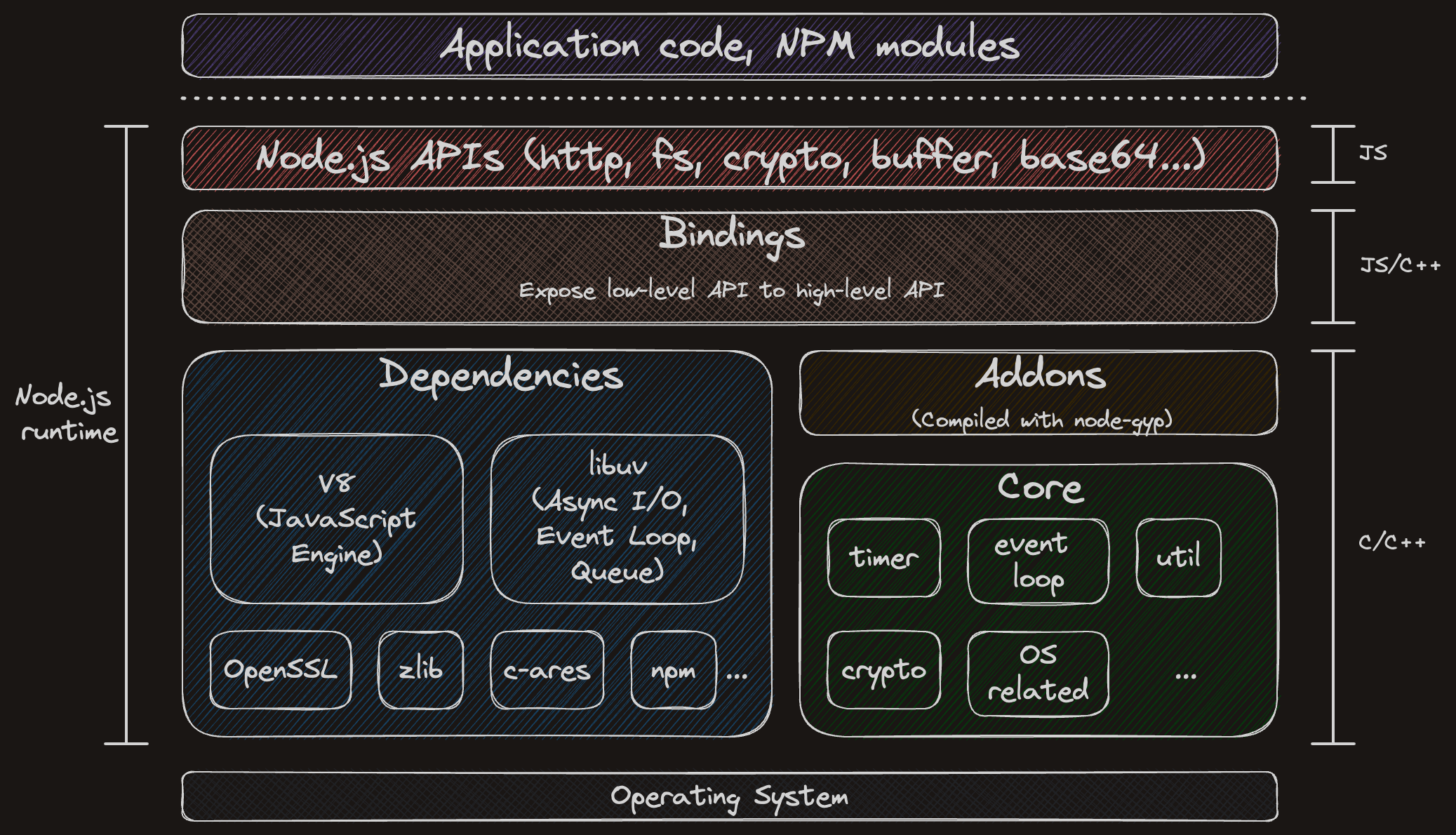
Node.js Architecture
Production Tips
Avoid root privileges
Running Node.js as root is a common mistake that can lead to security issues.
Switching to a non-root user before starting a containeris a good practice to avoid such vulnerabilities.
Properly configuring HTTP headers
Properly configuring HTTP headers is crucial to improve performance by enabling caching and enhances security by preventing common attacks such as XSS, clickjacking, MIME sniffing, etc.
Helmet.js is a popular library to secure HTTP headers by setting values for security-related headers using middleware pattern. This can be a starting point to secure the API, and further setting can be done once specific scenarios are identified.
import express from "express";
import helmet from "helmet";

const app = express();

// Use Helmet!
app.use(helmet());

app.get("/", (req, res) => {
  res.send("Hello world!");
});

app.listen(8000);
Http Observatory is an useful tool to check HTTP headers configuration.
Rate Limiting
Even Node.js is designed to handle high concurrent requests, it's still possible to overwhelm the server if not properly configured.
Express Rate Limit is a popular library to limit the number of requests per IP address or user ID.
import express from "express";
import rateLimit from "express-rate-limit";

const app = express();

// Apply the rate limiting middleware to all requests
app.use(
  rateLimit({
    windowMs: 15 * 60 * 1000, // 15 minutes
	  limit: 100, // Limit each IP to 100 requests per `window` (here, per 15 minutes).
  })
);
Properly enforce authentication
Authentication verifies the identity of a user sending the request, so proper authentication should be enforced to prevent unauthorized actions.
Common practice includes password-based authentication, session-based authentication, token-based authentication, Multi-Factor Authentication (MFA), JWT, etc.
When implementing password-based authentication, it's important to use hashing algorithm to prevent password from being compromised. bcrypt is one of the defacto standard for passwordhashing.
Passport.js is a popular library to implement authentication policies.
Validating user input
Validating and sanitizing user input is fundamental to preventing injection attacks, such as SQL injection, XSS, and more.
Express Validator is a popular library to validate user input.
const express = require('express');
const { query, matchedData, validationResult } = require('express-validator');
const app = express();

app.use(express.json());
app.get('/hello', query('person').notEmpty().escape(), (req, res) => {
  const result = validationResult(req);
  if (result.isEmpty()) {
    const data = matchedData(req);
    return res.send(`Hello, ${data.person}!`);
  }

  res.send({ errors: result.array() });
});